Open Geoviewer: Difference between revisions
Jump to navigation
Jump to search
Open Geoviewer
No edit summary |
|||
| (2 intermediate revisions by the same user not shown) | |||
| Line 3: | Line 3: | ||
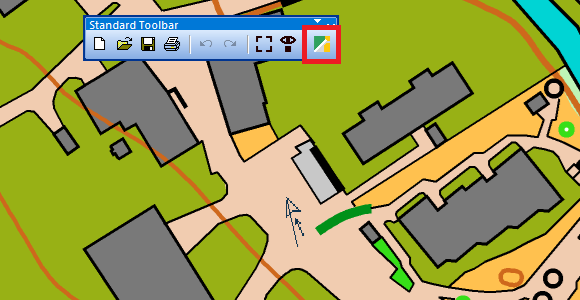
# Select the '''Open Geoviewer''' icon [[File:IconGSV.PNG]] in the toolbar. The cursor changes to an arrow. | # Select the '''Open Geoviewer''' icon [[File:IconGSV.PNG]] in the toolbar. The cursor changes to an arrow. | ||
#:The default geoviewer is Google Street View. | #:The default geoviewer is Google Street View. | ||
#:You can also choose another predefined geoviewer or add an own geoviewer in the '''[[OCAD_Preferences#Geoviewer_url|OCAD Preferences]]''' | #:You can also choose another predefined geoviewer (e.g. Apple Look Around Viewer) or add an own geoviewer in the '''[[OCAD_Preferences#Geoviewer_url|OCAD Preferences]]'''. | ||
#:[[File:Hint.jpg|hint]] The toolbar icon is disabled if the map is not georeferenced. | #:[[File:Hint.jpg|hint]] The toolbar icon is disabled if the map is not georeferenced. | ||
# Click into the drawing area and drag a direction. <br>[[File: | # Click into the drawing area and drag a direction. <br>[[File:OpenGeoviewer DragDirection-1.png]] | ||
# OCAD opens the web browser with Google Street View at the chosen position and direction.<br> | # OCAD opens the web browser with Google Street View at the chosen position and direction.<br> | ||
:: | ::[[File:OpenGeoviewer GoogleStreetView.png]] | ||
[[File: | ::Depending on the area, a different viewer (e.g. Apple Look Around Viewer) can be more up-to-date and more comprehensive, see example below. | ||
::[[File:OpenGeoviewer AppleLookAround.png]] | |||
::Date of recording is 2021 for Apple Look Around Viewer compared to 2014 in Google Street View. | |||
Latest revision as of 16:27, 9 December 2024
Open Geoviewer 


- Select the Open Geoviewer icon
 in the toolbar. The cursor changes to an arrow.
- The default geoviewer is Google Street View.
- You can also choose another predefined geoviewer (e.g. Apple Look Around Viewer) or add an own geoviewer in the OCAD Preferences.
 The toolbar icon is disabled if the map is not georeferenced.
- Click into the drawing area and drag a direction.
- OCAD opens the web browser with Google Street View at the chosen position and direction.


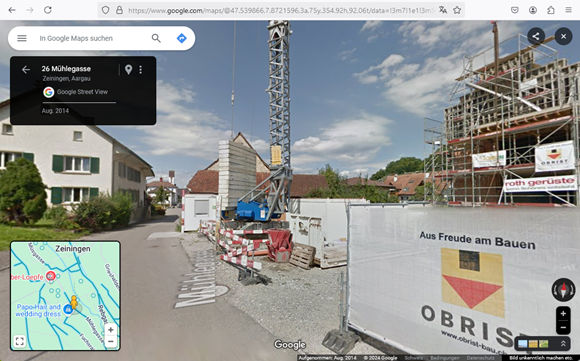
- Depending on the area, a different viewer (e.g. Apple Look Around Viewer) can be more up-to-date and more comprehensive, see example below.

- Date of recording is 2021 for Apple Look Around Viewer compared to 2014 in Google Street View.

